Showing posts with label Android. Show all posts
Why to Root your android

Hey there android users!wassup?are you in a dilemma of whether or not to root your android device? well,then this post is for you.i'm gonna briefly point out the advantages and dis advantages of rooting your android and then you yourself can weigh them and take a decision.
Advantages of Rooting Android phone:
Install incompatible Apps:


Your device may be the latest one with high specs,but still there are certain apps which you are not allowed to install on your devices.They maybe blocked by the carrier,or may need additional privileges to run or some times your phone may not be of the compatible brands,whatever the reason maybe,rooting helps you out
Automation:


There are some apps that can help you automate your everyday tasks,like enable/disable silent mode after particular time of the day,play songs when earphones are plugged in,silent on flip action( if not supported by default ),toggle wifi and mobile data basing on location or time and many more,you name it!you can get the full task automation capabilities over your droid once you root it
Boost phones speed and also battery life:

Battery life is one of the main things that bother us,and most of us do know how to optimize battery life.same is the issue with speed,but once you've rooted your phone you get the complete hands on to these features,you can overclock your processor and there are even some custom ROMs which consume lesser amounts of battery than your stock ROM
Block Ads:


Yes you can block Ads,pop ups in any app after you've rooted your device
Complete Backup:
Google may provide a backup of your primary data like contacts,mail,messages,wifi credentials etc but there are certain apps out there which can create a complete backup of your app/system data,which means once you've taken a backup of a game,and after you accidentally uninstalled it and then restored the backup,you would get all the old game coins,levels,missions etc right where you left them without having to play from the beginning
Remove pre-installed Apps( blotware ):

Most of the phones with stock ROMs come with many unwanted pre installed apps like flipkart,m buddy etc etc which are there even if we never use them,they are by default un-uninstallable,but rooting helps you get rid of them
Tweak every possible display element:


There are certain apps that allow you to customize every corner of your android without installing much of third party running services which hog your memory.you can customize your boot logo,system fonts,task bar,notifications,keyboards,list scroll effects,change the complete look and feel of your device
Functionality:

Here comes the main feature for power users,rooted devices provide a diverse and highly functional environment than the general android,you may be surprised to know that you can even run windows xp or kali linux on your android device,yes it is very possible.and there are tons of apps in the play store itself to add greater functionality to your rooted device
Social Networking made easy:

Apps like 2 lines for whatsapp or 2 lines for facebook lets you run multiple whatsapp or facebook accounts with the same device and you can switch between accounts within seconds
Flash Custom ROMs~one for every one!:

You don't have to stick to your stock ROM provided by the manufacturer,there are tons of custom ROMs out there available for free and which are highly tweaked and personalized by experts you can taste them all once you've rooted your device
Upgrade to latest version of android even before manufacturer releases OTA Update:
you no longer have to weight for the manufacturer to release an upgrade patch for you to get the latest android version,you simply can search for required ROM and flash it by yourself
PEN Test:

you can use your android device to hack into wifi,try dictionary attacks,perform MITM,cookie stealing,session jackings,network deAuths,ARP poisoning and all many more advanced PEN tests
The above are just some of the things you can do with your rooted android device,and when it come to the disadvantages of rooting,
- Voids warranty
- possibility of bricking (very very less probable)
- Minor issues with Google Wallet
Thats all,now its upto you to decide
Control VLC player with android

you may sometimes choose to relax,connect your pc to your tv via hdmi and watch some movie,but the thing is you need to get back to your pc every time you want to change the media or to tweak the volume,one comfortable way is to use your android device within the same network to control vlc media player,lets see how we can do it
- First download vlc remote setup helper
- Install it and run it

Now hit Setup vlc.then download VLC Remote Free,scan for your computer and you are all ready to go!and remember you need to run vlc setup helper every time you want to control vlc through android
Hide files from Android Gallery

If you want to hide media items from your android gallery without using any suspicious applications,you can simply follow this tutorial.
.nomedia method:
- All you would need is a good file manager.I would personally suggest using x-plore its a very good file manager
- open xplore and create a new text file

- remove the .txt extension and create a bare file with ".nomedia"extension remember leave it name less,but just with an extension

- now when it opens the editor just put in a dot,nothing else and save the file

- And now which ever directory contains this file will not be indexed in your android gallery.you can copy it and use for multiple directories,leaving it in your root sd card mount will prevent any media from being read by your device.
- once you've created this file,you can use it to hide multiple directories or even all the media files from your sd card at a shot
the "." :
.jpg)
in case you quickly want to hide a directory and don't have the above said .nomedia file,you can simply put a "." before the name of the directory and vola!its hidden from the gallery
Stay invisible on WhatsApp

Use WhatsApp Ghost to stay invisible or offline in WhatsApp.you can use whatsApp without being traced of the last login time
Use Multiple WhatsApp accounts

Even when sites like Facebook exist,WhatsApp still had a thing to be one of the widely used and favorite messenger.In this post lets see how we can run multiple whatsApp accounts for a single Android device
- Unfortunately yes you would need a Rooted Android device for this to work.
- Incase you use bluestack,you can see my post on how to root bluestacks
- Once you have a rooted device,install 2Lines for WhatsApp (see the logo? search for the same ) and you can add another whatsapp account

NOTE:once you've started using 2lines for whats app,you have to get into your whatsapp account only through this app again
- You can also try SwitchMe Multiple Accounts
Get Root access to BlueStacks
Hey guyz! it'z been a while since my last post,so hi again!
so if you have gone through my Emulators post,one of the most interesting thing you will find is the Bluestacks Android App player.yes its fun and comes in handy for those who don't have an android phone,but If your purpose for using Bluestacks is App testing,then at some point of time you would definetly need Root or SuperUser access.Lets see how we can break free Bluestackz from its chains shall we?

so if you have gone through my Emulators post,one of the most interesting thing you will find is the Bluestacks Android App player.yes its fun and comes in handy for those who don't have an android phone,but If your purpose for using Bluestacks is App testing,then at some point of time you would definetly need Root or SuperUser access.Lets see how we can break free Bluestackz from its chains shall we?

- First you need to have a latest version of BlueStacks.If you already have one,then its fine or else get one ( in case you have a old version,just give it a try if the rooting doesn't work then go on and download the newer version )
- once you've installed BlueStacks and its running well,now download the SUpatch pack
- Enable Hidden Folder Visibility
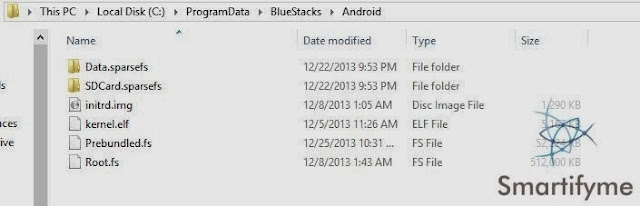
- Now open your c drive > program data > BlueStacks > Android

C:\ProgramData\BlueStacks\Android
- Now backup the two files initrd.img and Root.fs
- Uncompress the downloaded file (the supatch one ) and copy the two files in it to this folder and thats it!you are done rooting!
- TO verify,you whether rooting is done properly or not you can use Root Checker App

- For most of you i need not point of the advantages of having a rooted device,but incase you don't know,just google it ;)
Run BlueStacks on windows 8.1

Bluestacks app player has got some issues on running in windows 8.1.If you don't know what blueStacks is,try reading our emulators article.
To fix the compatibility issues in windows 8.1,follow the below steps:
First uninstall old version on Bluestacks from your computer.
Now download a fresh version on Bluestacks installer from bluestacks.com (and yes it is updated to jelly bean 4.3 )
once the installer is downloaded,right click on it and extract it using win rar

A folder appears with name blestacks-SplitInstaller blah blah blah open it.then you will find two file.
now right click the exe file and goto its properties

goto compatibility tab and choose run in compatibility mode and set the compatibility mode to windows 8

Now click Apply and then ok and now run the installer and when done,you will have your Bluestacks up and Running

Merge multiple vcf files

Google Contacts does not allow multiple vcf upload at a time,so the only available option is to upload each and ever vcf individually which is a damn tedious job.so today we'll see how to simply merge multiple vcf files into a single file.
- First move all the vcf files into a folder
- Now open command prompt in that folder,for windows 8,goto file menu select open command prompt

- if earlier version of windows, search for cmd and then change the working directory to the folder containing your vcfs using the cd keyword

cd [file path]
- Now type the below command
copy *.vcf merged.vcf


- There you go all your vcfs merged into one vcf file "merged.vcf" which you can directly upload to your google account
Try Our new Smartifyme Android App

To get all our Updates right on your mobile screen Download Smartifyme For Android.
Features:
- Fetches all our Feed and uses super flow to fit them beautifully into your screen
- Comes with Night Mode
- Grid and List Layouts
- Built in image viewer and web Browser
- Automatically sorts your feeds into read,unread and stared
- Quick share and star features available for posts
- Completely Customizable Data sync and update settings
- Notifications for new post updates
- Translate
- Auto clean ( to Optimize your device Storage )
- Read Articles even when Offline
Instructions for Installation:
- Enable install applications from unknown sources( settings => Applications =>enable Unknown Sources.
- Download the app and install it.
Some Screenshots:
.jpg "Try Our new Smartifyme Android App") |
| Grid view |
 |
| Night Mode |
 |
| List View |
.jpg "Try Our new Smartifyme Android App")

.jpg "Try Our new Smartifyme Android App") |
| Image viewer |
.jpg "Try Our new Smartifyme Android App")
.jpg)
Tag :
Android
A Feast for your Android
Smart App Protector:

Its the Best App locker and Mobile protector ever!i just can't list all the available features of it because there are too many but i would try to cover the important ones,
- Lock installed Apps using password (number, character), pattern, or gesture
- Fake Forced Close pop-up
- Wi-Fi whitelist to deactivate lock at whitelisted locations
- Set Lock Time to only activate lock at certain time
- Lock 3G data
- Intruder Monitor
- Stealth Mode
- Uninstall Preventer
- Completely customizable password screen
- Random password input screen generator
- Remote lock
- Gesture,number pin,char pin,pattern lock support
And much more but here is the best part itz FREE! most of other apps which support just a part of these features are to be paid for.download Smart App Protector
Puffin Browser:
Perhaps the #1 flash browser for your android it has a full flash support which means you can play all the online flash games right from your mobile device its awesome but just comes with a 14 day trial and a refferal may give you an additional 4 weeks.forr a full version of this browser you need to purchase it.Download Puffin Browser
Alternative:
you could also use Photon Flash Player and browser .i wouldn't say its the perfect free alternative,but it does the work
Clean Master:

Its a complete maintenance with one click.monitors your every app install and uninstall and gives suggestions on optimization.but the thing that intrests me more is it supports app back up.ie you can create a backup apk file of all your applications
Tip: create backups of the apps which you would be using rarely or occasionally like games,ringtone makers,photo editors etc and uninstall them from your device so that you can save a lot of internal storage and when needed you can install them back without having to download them every time
Google Goggles:
it once again proves what google is capable of,it just works like magic!just take a snap and within seconds you will have everything you would need to know about it
- It scans Qr codes,bar codes
- translates foreign languages,recognize landmarks,searchs for books
- It also Solves Sudoku Puzzles
Download Google Goggles
Wifi File Transfer:
It uses the File transfer protocol of your network to copy or edit files in your android basicaally it turns your android device as a file sharing server.this works only when your android and pc are in the same wifi network.
Instructions:
- Make sure both of your devices are connected to your wifi modem
- run wifi file transfer pro
- Open my computer and enter the network location given on your device in the address bar and hit enter


- Now you can simply copy,cut,rename,move or delete folders
Tip: In case ads are blocking the ftp url form the app,just check the notification bar after you've run the server and you'll find the address there
Night Mode:

It is another small yet useful app.it creates an overlay filter on your screen and reduces the brightness far more than what you can achieve physically.very useful when working with your device during night
Download Night Mode
LibriVox Audio Books:

1000s of Audio books at your finger tips.download LibriVox Audio Books
Tip: Do You know that you can replace the basic android keyboard with many fashionable and awesome looking keyboards without even rooting your device?Check this out
Micro Puzzle:

Retouch your knowledge on logic gates.its a fun way of learning.Download Micro Puzzle
Fake Me a Call:

As the name suggests,it fakes a phone call so that you can save your self from awkward situations.Download Fake Me a Call
ElectroDroid:
Its pretty much everything an electronics or an electrical Engineer would want.Download ElectroDroid
SmsBomber:

Its a blackmarket app,its not found in Google play store and can sometimes be identified as a threat by your anti virus,but it isn't.this app can be used to send multiple messages to the same person within a very less time,you know just to annoy them.you can Download SmsBomber

